mirror of
https://github.com/xushier/HD-Icons.git
synced 2026-09-14 20:34:04 +08:00
Compare commits
2
Commits
| Author | SHA1 | Date | |
|---|---|---|---|
 github-actions[bot] github-actions[bot]
|
865abf1be5 | ||
|
xushier
|
f2265cf358 |
@@ -0,0 +1,55 @@
|
||||
name: Build
|
||||
|
||||
on:
|
||||
push:
|
||||
branches: [main]
|
||||
paths:
|
||||
- "inbox/**"
|
||||
- "scripts/**"
|
||||
- ".github/workflows/build.yml"
|
||||
workflow_dispatch:
|
||||
|
||||
permissions:
|
||||
contents: write
|
||||
|
||||
concurrency:
|
||||
group: build
|
||||
cancel-in-progress: false
|
||||
|
||||
jobs:
|
||||
build:
|
||||
runs-on: ubuntu-latest
|
||||
steps:
|
||||
- name: 检出仓库
|
||||
uses: actions/checkout@v4
|
||||
|
||||
- name: 安装 Python
|
||||
uses: actions/setup-python@v5
|
||||
with:
|
||||
python-version: "3.12"
|
||||
|
||||
- name: 安装依赖
|
||||
run: |
|
||||
pip install Pillow
|
||||
if ! command -v rsvg-convert >/dev/null 2>&1; then
|
||||
sudo apt-get update -qq
|
||||
sudo apt-get install -y -qq librsvg2-bin
|
||||
fi
|
||||
|
||||
- name: 构建
|
||||
id: build
|
||||
env:
|
||||
TINYPNG_KEY: ${{ secrets.TINYPNG_KEY }}
|
||||
run: python scripts/build.py --repo .
|
||||
|
||||
- name: 提交并推送
|
||||
run: |
|
||||
git config user.name "github-actions[bot]"
|
||||
git config user.email "41898282+github-actions[bot]@users.noreply.github.com"
|
||||
git add -A
|
||||
if git diff --cached --quiet; then
|
||||
echo "没有需要提交的变更"
|
||||
else
|
||||
git commit -m "ci: 自动构建(新增 ${{ steps.build.outputs.added }} 个图标)"
|
||||
git push
|
||||
fi
|
||||
-222
@@ -1,222 +0,0 @@
|
||||
<div align="center">
|
||||
<img src="hd-icons.png" alt="logo" width="200">
|
||||
<h1>HD-Icons:高清仪表盘图标</h1>
|
||||
<p><em>1024×1024 超清分辨率 · 无损压缩优化 · 多种样式适配</em></p>
|
||||
</div>
|
||||
|
||||
|
||||
|
||||
<div align="center">
|
||||
<!-- 徽章区域 -->
|
||||
[](https://github.com/xushier/HD-Icons/stargazers)
|
||||
[](https://github.com/xushier/HD-Icons/network)
|
||||
[](https://github.com/xushier/HD-Icons/issues)
|
||||
[](https://github.com/xushier/HD-Icons/blob/master/LICENSE)
|
||||
|
||||
<!-- 统计信息 -->
|
||||
[](https://github.com/xushier/HD-Icons/releases)
|
||||
[](https://github.com/xushier/HD-Icons/commits/main)
|
||||
[](https://github.com/xushier/HD-Icons)
|
||||
|
||||
<!-- CDN 徽章 -->
|
||||
[](https://www.jsdelivr.com/package/gh/xushier/HD-Icons)
|
||||
|
||||
</div>
|
||||
|
||||
<div align="center">
|
||||
|
||||
<!-- 快速导航 -->
|
||||
<div>
|
||||
<a href="#-项目简介"><strong>📖 项目简介</strong></a> •
|
||||
<a href="#-使用说明三种方式"><strong>🚀 使用说明</strong></a> •
|
||||
<a href="#-图标预览"><strong>✨ 图标预览</strong></a> •
|
||||
<a href="https://github.com/xushier/HD-Icons/issues/new/choose"><strong>🎯 请求图标</strong></a>
|
||||
</div>
|
||||
|
||||
<!-- 活动图表 -->
|
||||
<div>
|
||||
<img align="center" alt="GitHub activity" src="https://repobeats.axiom.co/api/embed/94fe9f2a6c0bccb6dd42c71e49b6e83fc46aecf4.svg">
|
||||
</div>
|
||||
|
||||
</div>
|
||||
|
||||
|
||||
<!-- GETTING STARTED -->
|
||||
|
||||
## 📝 项目简介
|
||||
|
||||
> 🎯 **使命**:为 Unraid Docker 容器和各类仪表盘应用提供高质量、标准化的图标解决方案
|
||||
|
||||
### ✨ 核心特性
|
||||
|
||||
| 特性 | 描述 |
|
||||
|------|-----|
|
||||
| 🖼️ **超清分辨率** | 1024×1024 像素,确保在任何尺寸下都清晰锐利 |
|
||||
| 🗜️ **无损压缩** | 所有图标经过无损压缩,体积更小,质量不变 |
|
||||
| 🎨 **优化显示** | 图标主体适当放大,满足各种使用场景 |
|
||||
| 📁 **多样样式** | 提供 `border-radius`(圆角矩形)、 `circle`(圆形)和 `svg`(矢量)三种风格 |
|
||||
| 🔄 **持续更新** | 不定期添加新图标,满足不断增长的需求 |
|
||||
|
||||
### 🎯 适用场景
|
||||
|
||||
本项目最初为 `Unraid Docker` 容器图标展示而设计,现已扩展支持多种仪表盘应用、部分APP及其他用途:
|
||||
|
||||
|
||||
|
||||
| 应用程序 | 描述 | 链接 | 备注 |
|
||||
|----------|------|------|------|
|
||||
| **FlatNas** | 新晋现代化仪表盘 | [🔗](https://github.com/Garry-QD/FlatNas) | 开源免费 |
|
||||
| **Sun-Panel** | 适合国人体质的现代化仪表盘 | [🔗](https://github.com/hslr-s/sun-panel) | 1.3.0及之前版本开源,新版Pro授权99永久 |
|
||||
| **Dashy** | 现代化仪表盘 | [🔗](https://github.com/Lissy93/dashy) | 开源免费 |
|
||||
| **Homer Dashboard** | 简洁的静态主页 | [🔗](https://github.com/bastienwirtz/homer) | 开源免费 |
|
||||
| **Heimdall** | 应用程序仪表盘 | [🔗](https://github.com/linuxserver/Heimdall) | 开源免费 |
|
||||
| **Organizr(v2)** | 组织管理工具 | [🔗](https://github.com/causefx/Organizr) | 开源免费 |
|
||||
| **Flame** | 自托管仪表盘 | [🔗](https://github.com/pawelmalak/flame) | 开源免费 |
|
||||
| **SUI** | 简单用户界面 | [🔗](https://github.com/jeroenpardon/sui) | 开源免费 |
|
||||
|
||||
|
||||
|
||||
### 🌟 社区支持
|
||||
|
||||
|
||||
|
||||
| 平台 | 账号/群组 | 链接 |
|
||||
|------|-----------|------|
|
||||
| **B站** | 小迪课代表 | [🎬 传送门](https://space.bilibili.com/32313260) |
|
||||
| **公众号** | 小迪同学 | 📱 微信搜索关注 |
|
||||
| **QQ群** | 647605169 | 💬 加入讨论 |
|
||||
| **微信群** | dxyxddsbds(备注加群) | 📱 添加微信入群 |
|
||||
|
||||
|
||||
|
||||
> 💡 **需要新图标?** [点击这里提交请求](https://github.com/xushier/HD-Icons/issues/new/choose) 🎯
|
||||
|
||||
## 📖 使用说明(三种方式)
|
||||
|
||||
### 🐳 Docker 部署图标展示容器使用(强烈推荐)
|
||||
|
||||
> 🚀 **项目地址**:[HD-Icons-docker](https://github.com/xushier/HD-Icons-docker)
|
||||
>
|
||||
> 💡 **优势**:自动同步更新、一键复制、移动端适配、自定义上传
|
||||
|
||||
#### 🌟 功能展示
|
||||
|
||||
|
||||
|
||||
| 功能 | 预览 |
|
||||
|------|------|
|
||||
| **☀️ 日间模式** | <img src="day.png" alt="日间模式" width="400"> |
|
||||
| **🌙 夜间模式** | <img src="night.png" alt="夜间模式" width="400"> |
|
||||
| **📱 移动端适配** | <img src="mobile.png" alt="移动端自适应" height="400"> |
|
||||
| **📋 一键复制** | <img src="copy.png" alt="单击复制地址" height="400"> |
|
||||
| **📤 自定义上传** | <img src="upload.png" alt="自定义图片上传" height="400"> |
|
||||
|
||||
|
||||
|
||||
### 🔗 远程链接使用(自动同步更新)
|
||||
|
||||
#### 📋 GitHub 原始链接
|
||||
|
||||
> 🌐 **适用场景**:可直接访问 GitHub 的用户
|
||||
>
|
||||
> 📝 **格式**:`https://raw.githubusercontent.com/xushier/HD-Icons/main/border-radius/图标名称.png`
|
||||
>
|
||||
> 🔗 **项目地址**:[HD-Icons](https://github.com/xushier/HD-Icons)
|
||||
|
||||
#### ⚡ CDN 加速链接
|
||||
|
||||
> 🚀 **适用场景**:无法直接访问 GitHub 但需要使用 GitHub 图标源的用户
|
||||
>
|
||||
> 📝 **格式**:`https://cdn.jsdelivr.net/gh/xushier/HD-Icons/border-radius/图标名称.png`
|
||||
>
|
||||
> 💡 **优势**:全球 CDN 加速,访问速度更快
|
||||
|
||||
> 📌 **使用提示**:将上述链接中的 `图标名称` 替换为实际图标文件名即可。[📋 查看所有图标](#-图标预览)
|
||||
|
||||
### 📱 移动应用使用
|
||||
|
||||
> 🎯 **支持应用**:Yamby、Hills 等安卓 APP
|
||||
>
|
||||
> 📦 **图标包地址**:`https://raw.githubusercontent.com/xushier/HD-Icons/main/icons.json`
|
||||
>
|
||||
> ⚠️ **注意**:如无响应,请开启代理环境或自行部署
|
||||
>
|
||||
> 🚀 **自部署方案**:[HD-Icons-docker](https://github.com/xushier/HD-Icons-docker)
|
||||
|
||||
## ✨ 图标预览
|
||||
|
||||
> 🎨 **持续更新中**:当前共计 0 个,数量不断增加,欢迎提交新图标请求
|
||||
|
||||
### 📦 圆角矩形图标
|
||||
<div align="center">
|
||||
<img src="_icons-radius.jpg" alt="圆角矩形图标集合" width="90%">
|
||||
</div>
|
||||
|
||||
### ⭕ 圆形图标
|
||||
<div align="center">
|
||||
<img src="_icons-circle.jpg" alt="圆形图标集合" width="90%">
|
||||
</div>
|
||||
|
||||
### 🎨 SVG 矢量图标
|
||||
<div align="center">
|
||||
|
||||
<!-- SVG 图标预览区域 -->
|
||||
|
||||
<!-- 此处将自动生成 SVG 图标预览 -->
|
||||
|
||||
</div>
|
||||
|
||||
|
||||
<!-- LEGAL -->
|
||||
|
||||
---
|
||||
|
||||
## 🤝 支持与赞助
|
||||
|
||||
<div align="center">
|
||||
<p><strong>!!!项目批量使用请告知!!!</strong></p>
|
||||
<p><strong>💝 感谢您的支持,让这个项目持续发展!</strong></p>
|
||||
|
||||
<table>
|
||||
<tr>
|
||||
<td align="center">
|
||||
<img src="_DONATE_A.jpg?raw=true" alt="支付宝赞助" width="300">
|
||||
<p><strong>支付宝</strong></p>
|
||||
</td>
|
||||
<td align="center">
|
||||
<img src="_DONATE_W.jpg?raw=true" alt="微信赞助" width="300">
|
||||
<p><strong>微信支付</strong></p>
|
||||
</td>
|
||||
</tr>
|
||||
</table>
|
||||
|
||||
<p><em>赞助时请备注「图标」,感谢您的慷慨支持!</em></p>
|
||||
</div>
|
||||
|
||||
## 📜 免责声明
|
||||
|
||||
> ⚖️ **法律声明**:本仓库中图像的(几乎)所有产品名称、商标和注册商标均为其各自所有者的财产。仪表盘导航用户仅将本仓库中的所有图像用于识别目的。
|
||||
>
|
||||
> 📝 **使用说明**:这些图像文件中出现的名称、商标和品牌的使用不表示认可。
|
||||
|
||||
---
|
||||
|
||||
<div align="center">
|
||||
|
||||
### 🌟 项目统计
|
||||
|
||||
[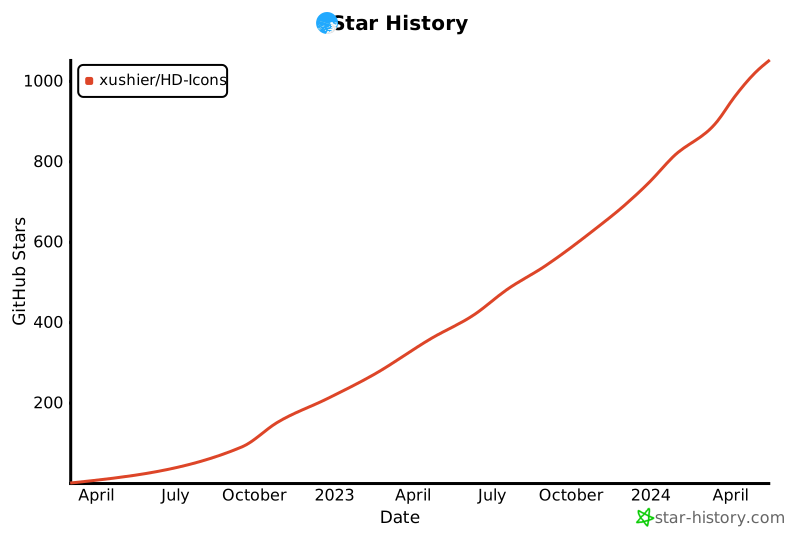](https://star-history.com/#xushier/HD-Icons&Date)
|
||||
|
||||
### 📊 项目活跃度
|
||||
|
||||

|
||||

|
||||
|
||||
</div>
|
||||
|
||||
---
|
||||
|
||||
<div align="center">
|
||||
<p><strong>🎯 如果这个项目对您有帮助,请给个 ⭐ Star 支持一下!</strong></p>
|
||||
<p><em>Made with ❤️ by xushier</em></p>
|
||||
</div>
|
||||
@@ -1,53 +0,0 @@
|
||||
import pathlib
|
||||
from pathlib import Path
|
||||
|
||||
root = pathlib.Path(__file__).parent.resolve()
|
||||
template_path = root / "_TEMPLATE.md"
|
||||
readme_path = root / "README.md"
|
||||
|
||||
|
||||
# def generate_img_tag(file,folder,radius):
|
||||
# return f'<div style="width: 105px;text-align: center;display: inline-block;font-size: 12px;margin: 5px;"><img style="border: 1.5px dashed white;border-radius: {radius};" src="{folder}/{file.name}" alt="{file.stem}" /><br/>{file.stem}</div>'
|
||||
|
||||
def generate_img_tag(file,folder):
|
||||
return f'<img src="{folder}/{file.name}" alt="{file.stem}" width="95">'
|
||||
|
||||
imgs = sorted(Path("./border-radius").glob("*.png"))
|
||||
img_tags = [generate_img_tag(x,"border-radius") for x in imgs]
|
||||
circle_imgs = sorted(Path("./circle").glob("*.png"))
|
||||
circle_img_tags = [generate_img_tag(x,"circle") for x in circle_imgs]
|
||||
svg_imgs = sorted(Path("./svg").glob("*.svg"))
|
||||
svg_img_tags = [generate_img_tag(x,"svg") for x in svg_imgs]
|
||||
all_nums = len(img_tags) + len(circle_img_tags) + len(svg_img_tags)
|
||||
|
||||
# Read the template file
|
||||
with open(template_path, "r", encoding="UTF-8") as f:
|
||||
lines = f.readlines()
|
||||
|
||||
# Find the line that starts with "<!-- ICONS -->"
|
||||
# for line in lines:
|
||||
# if line.startswith("<!-- START BORDER-RADIUS ICONS -->"):
|
||||
# line_number = lines.index(line)
|
||||
# break
|
||||
# for line in lines:
|
||||
# if line.startswith("<!-- START CIRCLE ICONS -->"):
|
||||
# circle_line_number = lines.index(line)
|
||||
# break
|
||||
for line in lines:
|
||||
if line.startswith("<!-- SVG 图标预览区域 -->"):
|
||||
svg_line_number = lines.index(line)
|
||||
break
|
||||
|
||||
# Insert the icons after the line
|
||||
# lines.insert(line_number + 1, " ".join(img_tags))
|
||||
# lines.insert(circle_line_number + 2, " ".join(circle_img_tags))
|
||||
lines.insert(svg_line_number + 3, " ".join(svg_img_tags))
|
||||
|
||||
lines = ["> 🎨 **持续更新中**:当前共计 " + str(all_nums) + " 个,数量不断增加,欢迎提交新图标请求" if '> 🎨 **持续更新中**:当前共计 0 个,数量不断增加,欢迎提交新图标请求' in i else i for i in lines]
|
||||
|
||||
# Write the new file
|
||||
with open(readme_path, "w", encoding="UTF-8") as f:
|
||||
f.write("".join(lines))
|
||||
f.write("\n")
|
||||
|
||||
print("文件已更新!")
|
||||

Binary file not shown.
|
Before Width: | Height: | Size: 457 KiB After Width: | Height: | Size: 556 KiB |

Binary file not shown.
|
Before Width: | Height: | Size: 3.2 MiB After Width: | Height: | Size: 4.4 MiB |

Binary file not shown.
|
After Width: | Height: | Size: 2.2 MiB |
+2
-2
@@ -1,8 +1,8 @@
|
||||
{
|
||||
"name": "小迪的HD-Icons",
|
||||
"description": "当前数量:1754,更新于:2026-02-01 21:43:36。不定期更新,有需求欢迎提交:github.com/xushier/HD-Icons",
|
||||
"description": "当前数量:1754,更新于:2026-08-27 13:45:23。不定期更新,有需求欢迎提交:github.com/xushier/HD-Icons",
|
||||
"total_count": 1754,
|
||||
"update_at": "2026-02-01 21:43:36",
|
||||
"update_at": "2026-08-27 13:45:23",
|
||||
"icons": [
|
||||
{
|
||||
"name": "115-drive-1",
|
||||
|
||||
@@ -0,0 +1,4 @@
|
||||
@echo off
|
||||
chcp 65001 >nul
|
||||
powershell -NoProfile -ExecutionPolicy Bypass -File "%~dp0publish.ps1" %*
|
||||
pause
|
||||
+52
@@ -0,0 +1,52 @@
|
||||
# HD-Icons 一键发布脚本
|
||||
# 用法:把新图标放入 inbox/ 对应子文件夹后,双击 publish.bat(或运行本脚本)
|
||||
# 可选参数:.\publish.ps1 -Message "自定义提交说明"
|
||||
|
||||
param([string]$Message = "")
|
||||
|
||||
$ErrorActionPreference = "Stop"
|
||||
Set-Location $PSScriptRoot
|
||||
|
||||
# 定位 git(git 不在 PATH 时使用常见安装路径)
|
||||
$git = "git"
|
||||
if (-not (Get-Command git -ErrorAction SilentlyContinue)) {
|
||||
$fallback = "C:\Program Files\Git\cmd\git.exe"
|
||||
if (Test-Path $fallback) { $git = $fallback } else {
|
||||
Write-Host "[错误] 未找到 git,请安装 Git 或将其加入 PATH" -ForegroundColor Red
|
||||
exit 1
|
||||
}
|
||||
}
|
||||
|
||||
# 检查 inbox 是否有新文件
|
||||
$inboxStatus = & $git status --porcelain -- inbox
|
||||
if (-not $inboxStatus) {
|
||||
Write-Host "inbox 中没有新图标,无需发布。" -ForegroundColor Yellow
|
||||
exit 0
|
||||
}
|
||||
|
||||
# 从文件名自动生成提交说明
|
||||
$names = @($inboxStatus | ForEach-Object {
|
||||
$_.Substring(3).Trim() -replace '^inbox/', ''
|
||||
} | ForEach-Object { [System.IO.Path]::GetFileNameWithoutExtension($_) -replace '-\d+$', '' } | Sort-Object -Unique)
|
||||
$prefixes = ($names | Select-Object -First 8) -join ", "
|
||||
if ($names.Count -gt 8) { $prefixes += " 等" }
|
||||
$fileCount = ($inboxStatus | Measure-Object).Count
|
||||
if (-not $Message) {
|
||||
$Message = "新增 $fileCount 个图标:$prefixes"
|
||||
}
|
||||
|
||||
Write-Host "本次发布:$Message" -ForegroundColor Cyan
|
||||
& $git add -A
|
||||
& $git commit -m $Message
|
||||
if ($LASTEXITCODE -ne 0) {
|
||||
Write-Host "[错误] 提交失败" -ForegroundColor Red
|
||||
exit 1
|
||||
}
|
||||
& $git push
|
||||
if ($LASTEXITCODE -ne 0) {
|
||||
Write-Host "[错误] 推送失败,请检查网络或凭据" -ForegroundColor Red
|
||||
exit 1
|
||||
}
|
||||
Write-Host ""
|
||||
Write-Host "已推送到 GitHub,Actions 将自动完成压缩、入库、索引、README 与预览图更新。" -ForegroundColor Green
|
||||
Write-Host "进度查看:https://github.com/xushier/HD-Icons/actions"
|
||||
@@ -0,0 +1,409 @@
|
||||
#!/usr/bin/env python3
|
||||
# -*- coding: utf-8 -*-
|
||||
"""
|
||||
HD-Icons 一键构建脚本(本地 / GitHub Actions 通用)
|
||||
|
||||
流程:
|
||||
1. 校验 inbox 新文件命名
|
||||
2. TinyPNG 无损压缩 inbox 中的 PNG(SVG 不压缩)
|
||||
3. 分发入库:inbox 文件移入对应目录,重名按"同前缀最大序号+1"自动改名
|
||||
4. 全量重建 icons.json(输出格式与历史版本完全一致)
|
||||
5. 更新 README.md 中的数量标记 <!--ICONS:xxx-->
|
||||
6. 重新生成三张合并预览图(_icons-radius.jpg / _icons-circle.jpg / _icons-svg.jpg)
|
||||
|
||||
用法:
|
||||
python scripts/build.py --repo .
|
||||
|
||||
环境变量:
|
||||
TINYPNG_KEY TinyPNG API 密钥(inbox 有 PNG 时必需;GitHub 上配置为 Secret)
|
||||
HDICONS_FONT 预览图标签字体路径(可选,默认自动查找)
|
||||
"""
|
||||
|
||||
import argparse
|
||||
import base64
|
||||
import json
|
||||
import os
|
||||
import re
|
||||
import shutil
|
||||
import subprocess
|
||||
import sys
|
||||
import tempfile
|
||||
import urllib.error
|
||||
import urllib.request
|
||||
from datetime import datetime
|
||||
from pathlib import Path
|
||||
|
||||
FOLDERS = ["border-radius", "circle", "svg"]
|
||||
RAW_BASE = "https://raw.githubusercontent.com/xushier/HD-Icons/main"
|
||||
IMAGE_EXTS = {".png", ".jpg", ".jpeg", ".svg", ".gif"}
|
||||
|
||||
NAME_RE = re.compile(r"^[a-z0-9]+(-[a-z0-9]+)*$")
|
||||
NUM_SUFFIX_RE = re.compile(r"-\d+$")
|
||||
README_MARKER_RE = re.compile(r"(<!--ICONS:(\w+)-->)(.*?)(<!--/ICONS:\2-->)")
|
||||
|
||||
# 预览图排版参数
|
||||
PREVIEW = {
|
||||
"icon": 128, # 单个图标缩略尺寸
|
||||
"cols": 15, # 每行图标数
|
||||
"gap_x": 30, # 水平间距
|
||||
"gap_y": 62, # 垂直间距(含文件名文字区域)
|
||||
"pad": 20, # 四周留白
|
||||
"text_size": 17, # 文件名字号
|
||||
"bg": (244, 246, 249),
|
||||
"fg": (62, 66, 72),
|
||||
}
|
||||
|
||||
|
||||
def log(msg):
|
||||
print(msg, flush=True)
|
||||
|
||||
|
||||
def warn(msg):
|
||||
print(f"[警告] {msg}", file=sys.stderr, flush=True)
|
||||
|
||||
|
||||
def fail(msg):
|
||||
print(f"[错误] {msg}", file=sys.stderr, flush=True)
|
||||
sys.exit(1)
|
||||
|
||||
|
||||
# ---------------------------------------------------------------- 1. 校验 inbox
|
||||
|
||||
def validate_inbox(repo):
|
||||
"""检查 inbox 内新文件的类型与命名,返回 (errors, warnings, files)。"""
|
||||
errors, warnings, files = [], [], {}
|
||||
for folder in FOLDERS:
|
||||
inbox_dir = repo / "inbox" / folder
|
||||
items = []
|
||||
if not inbox_dir.is_dir():
|
||||
files[folder] = items
|
||||
continue
|
||||
expected = ".svg" if folder == "svg" else ".png"
|
||||
for f in sorted(inbox_dir.iterdir()):
|
||||
if f.name == ".gitkeep" or not f.is_file():
|
||||
continue
|
||||
if f.suffix.lower() != expected:
|
||||
errors.append(f"inbox/{folder}/ 只接受 {expected} 文件,发现:{f.name}")
|
||||
continue
|
||||
if not NAME_RE.match(f.stem):
|
||||
errors.append(f"命名不合法(仅允许小写字母/数字/连字符):{f.name}")
|
||||
continue
|
||||
if not NUM_SUFFIX_RE.search(f.stem):
|
||||
warnings.append(f"{f.name} 未以数字结尾,建议形如 name-1 的命名")
|
||||
items.append(f)
|
||||
files[folder] = items
|
||||
return errors, warnings, files
|
||||
|
||||
|
||||
# ---------------------------------------------------------------- 2. TinyPNG 压缩
|
||||
|
||||
def tinify(path, key):
|
||||
"""调用 TinyPNG API 压缩单个 PNG,返回 (压缩前字节数, 压缩后字节数, 已用额度)。"""
|
||||
data = path.read_bytes()
|
||||
req = urllib.request.Request("https://api.tinify.com/shrink", data=data)
|
||||
req.add_header("Authorization",
|
||||
"Basic " + base64.b64encode(f"api:{key}".encode()).decode())
|
||||
with urllib.request.urlopen(req, timeout=180) as resp:
|
||||
info = json.loads(resp.read().decode())
|
||||
quota = (resp.headers.get("Compression-Count")
|
||||
or resp.headers.get("X-Compression-Count"))
|
||||
with urllib.request.urlopen(info["output"]["url"], timeout=180) as r:
|
||||
out = r.read()
|
||||
if len(out) < len(data):
|
||||
path.write_bytes(out)
|
||||
return len(data), path.stat().st_size, quota
|
||||
|
||||
|
||||
def compress_inbox(files, key):
|
||||
saved = 0
|
||||
quota = None
|
||||
pngs = files["border-radius"] + files["circle"]
|
||||
for f in pngs:
|
||||
try:
|
||||
before, after, quota = tinify(f, key)
|
||||
except urllib.error.HTTPError as e:
|
||||
if e.code == 429:
|
||||
fail("TinyPNG 本月免费额度已用完(500 张/月),本次未做任何改动")
|
||||
fail(f"压缩失败 {f.name}:HTTP {e.code} {e.reason}")
|
||||
except (urllib.error.URLError, OSError) as e:
|
||||
fail(f"压缩失败 {f.name}:网络错误 {e}")
|
||||
saved += before - after
|
||||
log(f" {f.name}: {before // 1024}KB -> {after // 1024}KB")
|
||||
msg = f"共压缩 {len(pngs)} 张,节省 {saved // 1024}KB"
|
||||
if quota:
|
||||
msg += f"(本月已用 {quota}/500)"
|
||||
log(msg)
|
||||
|
||||
|
||||
# ---------------------------------------------------------------- 3. 分发入库
|
||||
|
||||
def available_name(target_dir, name):
|
||||
"""若目标已存在同名文件,按"同前缀最大序号+1"改名,否则保持原名。"""
|
||||
if not (target_dir / name).exists():
|
||||
return name
|
||||
stem, ext = Path(name).stem, Path(name).suffix
|
||||
prefix = NUM_SUFFIX_RE.sub("", stem)
|
||||
max_num = 0
|
||||
for f in target_dir.iterdir():
|
||||
m = re.fullmatch(re.escape(prefix) + r"-(\d+)", f.stem)
|
||||
if m and f.suffix.lower() == ext.lower():
|
||||
max_num = max(max_num, int(m.group(1)))
|
||||
n = max_num + 1
|
||||
while (target_dir / f"{prefix}-{n}{ext}").exists():
|
||||
n += 1
|
||||
return f"{prefix}-{n}{ext}"
|
||||
|
||||
|
||||
def dispatch(repo, files):
|
||||
moved = []
|
||||
for folder, items in files.items():
|
||||
if not items:
|
||||
continue
|
||||
target = repo / folder
|
||||
for f in items:
|
||||
new_name = available_name(target, f.name)
|
||||
if new_name != f.name:
|
||||
log(f" 重名处理:{folder}/{f.name} -> {new_name}")
|
||||
shutil.move(str(f), str(target / new_name))
|
||||
moved.append(f"{folder}/{new_name}")
|
||||
return moved
|
||||
|
||||
|
||||
# ---------------------------------------------------------------- 4. icons.json
|
||||
|
||||
def build_icons_json(repo):
|
||||
"""全量重建 icons.json,逻辑与历史脚本一致(含跨目录重名加后缀的去重行为)。"""
|
||||
icons, used = [], set()
|
||||
counts = {"radius": 0, "circle": 0, "svg": 0}
|
||||
for folder in FOLDERS:
|
||||
d = repo / folder
|
||||
if not d.is_dir():
|
||||
warn(f"文件夹不存在,跳过:{folder}")
|
||||
continue
|
||||
for file in sorted(d.iterdir()):
|
||||
if not (file.is_file() and file.suffix.lower() in IMAGE_EXTS):
|
||||
continue
|
||||
name = file.stem
|
||||
original = name
|
||||
url = f"{RAW_BASE}/{folder}/{file.name}"
|
||||
counter = 1
|
||||
while name in used:
|
||||
name = f"{original}-{counter}"
|
||||
counter += 1
|
||||
used.add(name)
|
||||
icons.append({"name": name, "url": url})
|
||||
counts[{"border-radius": "radius", "circle": "circle", "svg": "svg"}[folder]] += 1
|
||||
|
||||
update_at = datetime.now().strftime("%Y-%m-%d %H:%M:%S")
|
||||
data = {
|
||||
"name": "小迪的HD-Icons",
|
||||
"description": (f"当前数量:{len(icons)},更新于:{update_at}。"
|
||||
"不定期更新,有需求欢迎提交:github.com/xushier/HD-Icons"),
|
||||
"total_count": len(icons),
|
||||
"update_at": update_at,
|
||||
"icons": icons,
|
||||
}
|
||||
(repo / "icons.json").write_text(
|
||||
json.dumps(data, ensure_ascii=False, indent=4) + "\n", encoding="utf-8")
|
||||
counts["total"] = len(icons)
|
||||
return counts
|
||||
|
||||
|
||||
# ---------------------------------------------------------------- 5. README 标记
|
||||
|
||||
def update_readme(repo, counts):
|
||||
readme = repo / "README.md"
|
||||
if not readme.is_file():
|
||||
warn("README.md 不存在,跳过数量更新")
|
||||
return
|
||||
text = readme.read_text(encoding="utf-8")
|
||||
|
||||
def repl(m):
|
||||
key = m.group(2)
|
||||
if key in counts:
|
||||
return m.group(1) + str(counts[key]) + m.group(4)
|
||||
warn(f"README 中存在未知标记 ICONS:{key}")
|
||||
return m.group(0)
|
||||
|
||||
readme.write_text(README_MARKER_RE.sub(repl, text), encoding="utf-8")
|
||||
|
||||
|
||||
# ---------------------------------------------------------------- 6. 预览图
|
||||
|
||||
def load_font(size):
|
||||
from PIL import ImageFont
|
||||
candidates = [
|
||||
os.environ.get("HDICONS_FONT"),
|
||||
str(Path(__file__).resolve().parent / "fonts" / "DejaVuSans.ttf"),
|
||||
"/usr/share/fonts/truetype/dejavu/DejaVuSans.ttf",
|
||||
"C:/Windows/Fonts/segoeui.ttf",
|
||||
"C:/Windows/Fonts/arial.ttf",
|
||||
]
|
||||
for c in candidates:
|
||||
if c and Path(c).is_file():
|
||||
try:
|
||||
return ImageFont.truetype(c, size)
|
||||
except OSError:
|
||||
pass
|
||||
warn("未找到可用字体,预览图将使用默认位图字体")
|
||||
return ImageFont.load_default()
|
||||
|
||||
|
||||
def rasterize_svg(svg_path, size, cache_dir):
|
||||
"""把 SVG 光栅化为 PNG(依次尝试 rsvg-convert / resvg / cairosvg),失败返回 None。"""
|
||||
out = cache_dir / (svg_path.stem + ".png")
|
||||
if out.exists():
|
||||
return out
|
||||
cmds = []
|
||||
if shutil.which("rsvg-convert"):
|
||||
cmds.append(["rsvg-convert", "-w", str(size), "-h", str(size),
|
||||
"-o", str(out), str(svg_path)])
|
||||
if shutil.which("resvg"):
|
||||
cmds.append(["resvg", "--width", str(size), "--height", str(size),
|
||||
str(svg_path), str(out)])
|
||||
for cmd in cmds:
|
||||
try:
|
||||
if subprocess.run(cmd, capture_output=True, timeout=60).returncode == 0 \
|
||||
and out.exists():
|
||||
return out
|
||||
except (OSError, subprocess.TimeoutExpired):
|
||||
pass
|
||||
try:
|
||||
import cairosvg
|
||||
cairosvg.svg2png(url=str(svg_path), write_to=str(out),
|
||||
output_width=size, output_height=size)
|
||||
if out.exists():
|
||||
return out
|
||||
except Exception:
|
||||
pass
|
||||
return None
|
||||
|
||||
|
||||
def merge_preview(repo, folder, out_name):
|
||||
"""把目录内全部图标合并为一张带文件名标注的 JPEG 预览图。"""
|
||||
from PIL import Image, ImageDraw
|
||||
import textwrap
|
||||
|
||||
src = repo / folder
|
||||
files = sorted(f for f in src.iterdir()
|
||||
if f.is_file() and f.suffix.lower() in IMAGE_EXTS)
|
||||
if not files:
|
||||
warn(f"{folder}/ 为空,跳过预览图 {out_name}")
|
||||
return
|
||||
|
||||
font = load_font(PREVIEW["text_size"])
|
||||
cell_w = PREVIEW["icon"] + PREVIEW["gap_x"]
|
||||
cell_h = PREVIEW["icon"] + PREVIEW["gap_y"]
|
||||
rows = (len(files) + PREVIEW["cols"] - 1) // PREVIEW["cols"]
|
||||
width = PREVIEW["cols"] * cell_w - PREVIEW["gap_x"] + 2 * PREVIEW["pad"]
|
||||
height = rows * cell_h - PREVIEW["gap_y"] + 2 * PREVIEW["pad"]
|
||||
|
||||
sheet = Image.new("RGB", (width, height), PREVIEW["bg"])
|
||||
draw = ImageDraw.Draw(sheet)
|
||||
|
||||
cache_dir = Path(tempfile.mkdtemp(prefix="hdicons_"))
|
||||
skipped = 0
|
||||
try:
|
||||
for i, f in enumerate(files):
|
||||
row, col = divmod(i, PREVIEW["cols"])
|
||||
x = col * cell_w + PREVIEW["pad"]
|
||||
y = row * cell_h + PREVIEW["pad"]
|
||||
|
||||
if f.suffix.lower() == ".svg":
|
||||
raster = rasterize_svg(f, 512, cache_dir)
|
||||
if raster is None:
|
||||
skipped += 1
|
||||
continue
|
||||
f = raster
|
||||
try:
|
||||
icon = Image.open(f).convert("RGBA")
|
||||
except OSError as e:
|
||||
warn(f"无法读取 {f.name}:{e}")
|
||||
skipped += 1
|
||||
continue
|
||||
icon = icon.resize((PREVIEW["icon"], PREVIEW["icon"]),
|
||||
Image.Resampling.LANCZOS)
|
||||
sheet.paste(icon, (x, y), icon)
|
||||
|
||||
wrapped = "\n".join(textwrap.wrap(f.stem, width=16))
|
||||
bbox = draw.textbbox((0, 0), wrapped, font=font)
|
||||
text_w = bbox[2] - bbox[0]
|
||||
draw.text((x + (PREVIEW["icon"] - text_w) // 2,
|
||||
y + PREVIEW["icon"] + 4),
|
||||
wrapped, font=font, fill=PREVIEW["fg"])
|
||||
finally:
|
||||
shutil.rmtree(cache_dir, ignore_errors=True)
|
||||
|
||||
rendered = len(files) - skipped
|
||||
if rendered < len(files):
|
||||
# 预览图必须包含全部图标,有遗漏时不覆盖已有图片,避免生成残缺预览
|
||||
warn(f"{folder} 有 {skipped} 个文件未能渲染(SVG 光栅化不可用或文件损坏),"
|
||||
f"本次跳过写入 {out_name},保留现有版本")
|
||||
return
|
||||
out_path = repo / out_name
|
||||
sheet.save(out_path, format="JPEG", quality=78, dpi=(128, 128))
|
||||
log(f" {out_name}: {len(files)} 个图标,{sheet.width}x{sheet.height}")
|
||||
|
||||
|
||||
# ---------------------------------------------------------------- 主流程
|
||||
|
||||
def main():
|
||||
parser = argparse.ArgumentParser(description="HD-Icons 一键构建")
|
||||
parser.add_argument("--repo", default=".", help="仓库根目录")
|
||||
parser.add_argument("--skip-compress", action="store_true",
|
||||
help="跳过 TinyPNG 压缩(仅调试用)")
|
||||
args = parser.parse_args()
|
||||
repo = Path(args.repo).resolve()
|
||||
|
||||
log("== 1/6 校验 inbox ==")
|
||||
errors, warnings, inbox_files = validate_inbox(repo)
|
||||
for w in warnings:
|
||||
warn(w)
|
||||
if errors:
|
||||
for e in errors:
|
||||
warn(e)
|
||||
fail("inbox 存在问题,已中止(所有文件保持原样)")
|
||||
|
||||
png_count = len(inbox_files["border-radius"]) + len(inbox_files["circle"])
|
||||
svg_count = len(inbox_files["svg"])
|
||||
total_inbox = png_count + svg_count
|
||||
log(f"inbox 共 {total_inbox} 个新文件(PNG {png_count},SVG {svg_count})")
|
||||
|
||||
if png_count and not args.skip_compress:
|
||||
key = os.environ.get("TINYPNG_KEY", "").strip()
|
||||
if not key:
|
||||
fail("inbox 中有 PNG 但未设置 TINYPNG_KEY"
|
||||
"(GitHub 上需在 Settings -> Secrets 中配置)")
|
||||
log("== 2/6 TinyPNG 无损压缩 ==")
|
||||
compress_inbox(inbox_files, key)
|
||||
else:
|
||||
log("== 2/6 跳过压缩(无 PNG 或指定 --skip-compress)==")
|
||||
|
||||
log("== 3/6 分发入库 ==")
|
||||
moved = dispatch(repo, inbox_files)
|
||||
for m in moved:
|
||||
log(f" + {m}")
|
||||
|
||||
log("== 4/6 重建 icons.json ==")
|
||||
counts = build_icons_json(repo)
|
||||
log(f"总数 {counts['total']}(圆角矩形 {counts['radius']} / "
|
||||
f"圆形 {counts['circle']} / SVG {counts['svg']})")
|
||||
|
||||
log("== 5/6 更新 README 数量标记 ==")
|
||||
update_readme(repo, counts)
|
||||
|
||||
log("== 6/6 生成预览图 ==")
|
||||
merge_preview(repo, "border-radius", "_icons-radius.jpg")
|
||||
merge_preview(repo, "circle", "_icons-circle.jpg")
|
||||
merge_preview(repo, "svg", "_icons-svg.jpg")
|
||||
|
||||
gh_output = os.environ.get("GITHUB_OUTPUT")
|
||||
if gh_output:
|
||||
with open(gh_output, "a", encoding="utf-8") as f:
|
||||
f.write(f"added={len(moved)}\n")
|
||||
|
||||
log(f"完成!本次新增 {len(moved)} 个图标。")
|
||||
|
||||
|
||||
if __name__ == "__main__":
|
||||
main()
|
||||
Binary file not shown.
Reference in New Issue
Block a user